


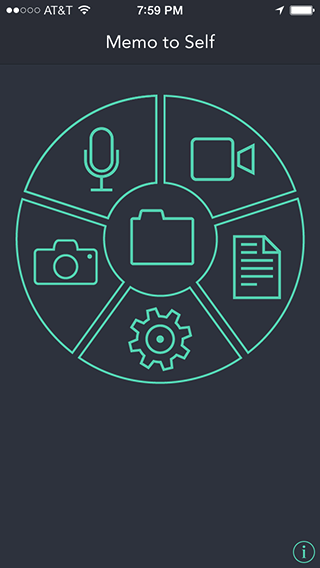
The note memo can be started by touching the notepad icon on the main screen.
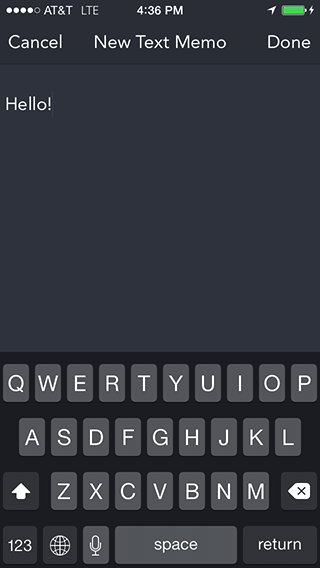
When the note memo is started, the text entry screen on the right will appear. Hit the cancel button if you want to stop taking a note memo. You'll be taken back to the main screen. Use the keyboard to enter your note memo. Touch the Done button when you're finished with the note. Then you will see the screen shown in Step 3.
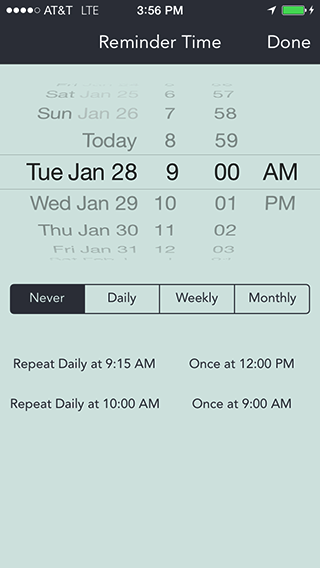
After you've created the note, the screen shown at the right will appear. This is used to select an alarm date and time. It provides two methods. The first is to use the Date/Time picker to select the date and time for the alarm. You are not allowed to set a time in the past. The Repeat Interval selection sets if and when the alarm will repeat. Once means it will occur only once at the date and time selected. The other choices mean the alarm will repeat at either daily, weekly, or monthly intervals after the first alarm occurs. When the settings are correct, touch the Done button to save the memo with the alarm time and repeat interval.
The other method of setting an alarm is to touch one of the four preset alarm times. The next alarm date and time is shown in each preset button. These are set by the user in the Settings screen. The presets do not have a specific initial alarm date, only a time. The alarm date is calculated by adding the repeat interval value to the current day (zero for Once, 1 day for Daily, 7 days for Weekly, and 1 month for Monthly). The alarm time is set to the time picker value. The one exception is if the repeat interval is Once and the current time is after the alarm time. In that case the alarm day is set to the next day. There is no indication on the preset buttons if the alarm is repeating or what the repeat interval is.