


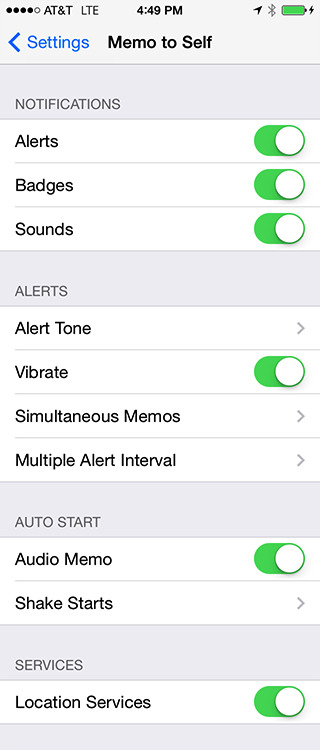
Run the Settings app and select Don't Forget. The settings are divided into four categories.
1. Notifications - These settings allow you to configure what types of notifications are used when an alarm occurs.
2. Alerts - These settings control what to do when an alert occurs.
3. Auto Start - Controls what action will automatically start a memo.
4. Services - Enable to disable services.
Alerts are popups that occur telling you that a Don't Forget alarm has occurred.
Badges are a small red icon on the Don't Forget program icon. The number indicates the number of alarms that are pending.
Sounds allows you to turn on or off the playing of an alert tone when an alarm occurs.
Choose one of the tones to sound when an alarm occurs.
Vibrate when an alert occurs.
How to handle memos that occur within a given interval. Sound One Alert even if there are more than one memo. Or Multiple alerts, i.e. one alert for every memo.
The time interval to use when Simultaneous Memos is set to One Alert. E.g. if the value is 10 Minutes, then all alerts between 9:00 and 9:09 will sound one alert Each hour will be divided into 6 intervals of 10 minutes each with only one alert for each interval.
Automatically start an audio memo when the iPhone is next to your mouth. When the iPhone is moved away from your face, the memo is saved with the default alarm time. Only active from the main screen.
Choose which memo type will automatically start when the shake gesture is done. Choices are Image Memo, Video Memo, or None. When the memo is finished, saved with the default alarm time. Only active from the main screen.
When ON, your location is saved with the memo.
Default Alarm Time Settings
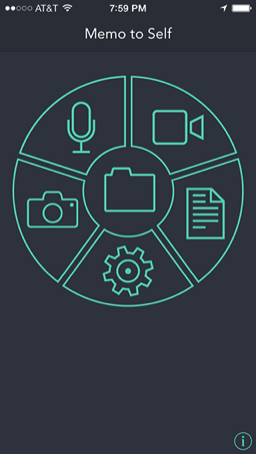
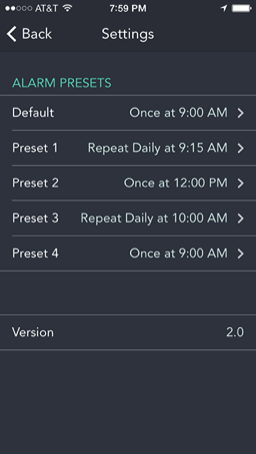
Access these settings by touching the Settings icon on the main screen.
These settings are the default alarm times that are displayed on the Reminder Date/Time screen. The Default setting will be the default value for the date picker and the Repeat Interval control. This value is also used when a memo is created using the proximity detector or the shake gesture.
Preset 1 though 4 are the four alarm times that appear at the bottom of the Reminder Date/Time screen. Selecting the disclosure arrow allows you to change the value. On the Reminder Date/Time screen, the buttons are laid out left to right, top to bottom. I.e. the preset button numbering is:
[Preset #1] [Preset #2]
[Preset #3] [Preset #4]
For the presets the alarm date is calculated by adding the repeat interval value to the current day (zero for Once, 1 day for Daily, 7 days for Weekly, and 1 month for Monthly). The alarm time is set to the time picker value. The one exception is if the repeat interval is Once and the current time is after the alarm time. In that case the alarm day is set to the next day.
Access these settings by touching the Settings icon on the main screen.
These settings are the default alarm times that are displayed on the Reminder Date/Time screen. The Default setting will be the default value for the date picker and the Repeat Interval control. This value is also used when a memo is created using the proximity detector or the shake gesture.
Preset 1 though 4 are the four alarm times that appear at the bottom of the Reminder Date/Time screen. Selecting the disclosure arrow allows you to change the value. On the Reminder Date/Time screen, the buttons are laid out left to right, top to bottom. I.e. the preset button numbering is:
[Preset #1] [Preset #2]
[Preset #3] [Preset #4]
For the presets the alarm date is calculated by adding the repeat interval value to the current day (zero for Once, 1 day for Daily, 7 days for Weekly, and 1 month for Monthly). The alarm time is set to the time picker value. The one exception is if the repeat interval is Once and the current time is after the alarm time. In that case the alarm day is set to the next day.
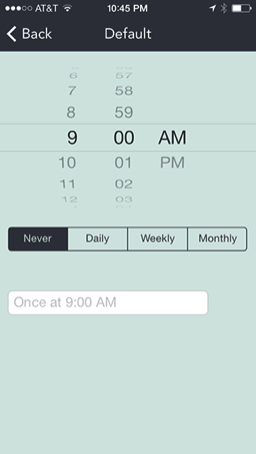
Use the time picker to select the alarm time you desire. Select one of the four repeat intervals. If the current time when the memo is created is before the alarm time, then the alarm will sound the day the memo was created. If the current time is after the alarm time, then the alarm will sound at the next specified interval.
Never - Alarm will occur once the next time the alarm time occurs. If the current time is after the alarm time, then the alarm will sound once the next day.
Daily - Sound the alarm once every day at the specified time. If the alarm time is after the current time, then the first alarm will occur the next day.
Weekly - Sound the alarm every 7 days at the specified time. If the current time is before the alarm time, then the first alarm will be the same day. Otherwise, the first alarm will sound the next week.
Monthly - Sound the alarm once a month on the same day the memo was created. If the current time is before the alarm time, then the first alarm will be the same day. Otherwise the first alarm will sound the next month on the same day the memo was created.